Also available in Portuguese: Notação musical no Standard Notes: ABC, ChordPro e alphaTex.
Standard Notes is a free, open source, end-to-end encrypted notes app that I have used since April 2024. Besides the default editor, it accepts custom editors, and I have been writing a few:
- the API client, with requests in
.httpsyntax, built on CodeMirror and the Standard Notes editor-kit; - the Kanban board, with the board saved as Markdown, using
@hello-pangea/dndfor drag and drop and the Standard Notes component-relay to talk to the app; - the Milkdown editor, a visual Markdown editor on Milkdown Crepe (ProseMirror), with CodeMirror 6 for the source view and Mermaid for diagrams.
All of them share the same base: React 18 and TypeScript, built with Vite, the Standard Notes stylekit for the themes, Vitest and fast-check for unit tests and Playwright for end-to-end tests.
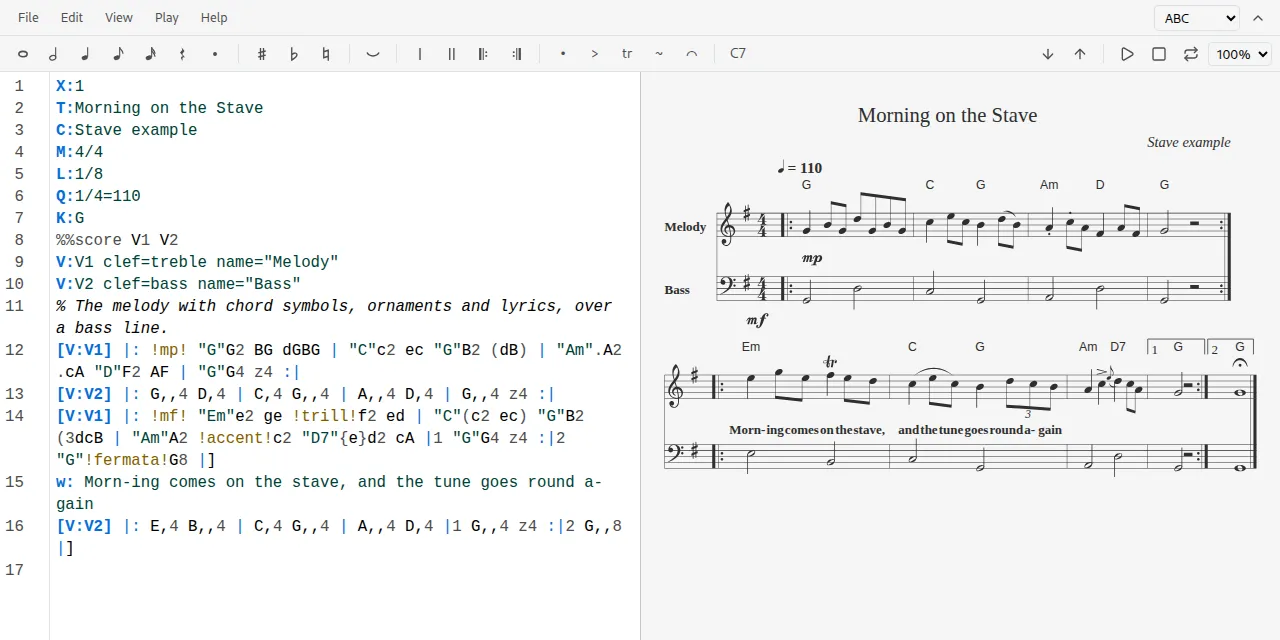
The fourth is Stave, a music notation editor. You write the music as text, and it draws the score, tablature or chord sheet next to it, plays it and exports it (SVG, PNG, MIDI, PDF, Guitar Pro). The rule is the same as in the other plugins: the note keeps only the text, so it stays readable without the plugin and is encrypted like the rest of your data.
Stave reads three text formats: ABC, ChordPro and alphaTex. They look like they do the same job, but each was made for a different kind of musician, and that is what this post is about.
Table of contents
Open Table of contents
Installing Stave
-
In Standard Notes (web or desktop), open Preferences, then Plugins.
-
At the bottom of the page, paste the URL below into Install Custom Plugin:
https://esli.cafe/StandardNotes-Stave/ext.json -
Create a note, open the Editor menu and pick Stave.
You do not have to pick the format: Stave detects it from the text. If the first line starts with X:, it is ABC; lines with tags such as \title mean alphaTex; directives such as {title:} or lyrics with [chords] mean ChordPro. An empty note offers a template for each, and the Help menu has a cheat sheet for all three.
ABC
Origin
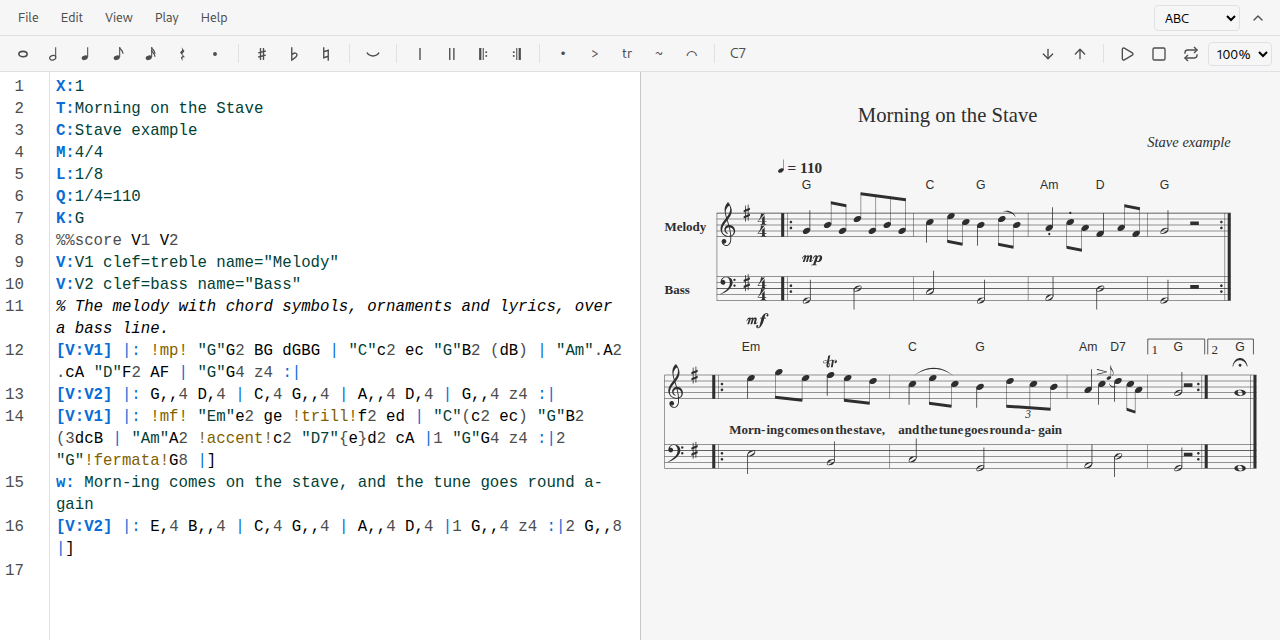
ABC was created by Chris Walshaw in the early 1990s to write down traditional tunes, mostly Irish and Scottish, in a way that would fit in an email or a Usenet post. The idea was that a musician could read the text without any software at all. It worked: tens of thousands of folk tunes are published in ABC today, and the current version of the standard is 2.1. In Stave, drawing and playback are done by abcjs, by Paul Rosen.
Syntax
An ABC file has a header of one-letter fields followed by a colon, then the body with the notes:
X:reference number, always the first field;T:title,C:composer;M:meter, such as4/4or6/8;L:default note length, such as1/8(an eighth note);Q:tempo, such as1/4=110;K:key, always the last field of the header.
In the body:
- Notes are letters.
C D E F G A Bis the octave starting at middle C; in lowercase,c d e ... b, one octave up. A comma lowers an octave (G,) and an apostrophe raises one (c'). - The length is a multiplier of
L:. WithL:1/8,Gis an eighth note,G2a quarter,G4a half andG/2a sixteenth. ^is sharp,_is flat and=is natural:^F,_B.zis a rest, with the same length rule.|separates bars,|: ... :|marks a repeat, and[1and[2the first and second endings.- Text in quotes before a note is a chord symbol:
"G"G2. - Ornaments and dynamics go between exclamation marks:
!trill!,!fermata!,!mp!. w:right under a line of notes holds the lyrics, one syllable per note.V:defines voices, for a melody and a bass line on separate staves, for example.
Example
X:1
T:Morning on the Stave
M:4/4
L:1/8
K:G
|: "G"G2 BG dGBG | "C"c2 ec "G"B2 dB | "Am"A2 cA "D"F2 AF | "G"G4 z4 :|
A tune in G major, 4/4, four bars with a repeat and a chord on each strong beat. You can read it and hum it without rendering anything, which is the whole point.
Links
- abcnotation.com, the home of the format, with tutorials and a tune search
- ABC standard 2.1, the full specification
- ABC tutorial, by John Chambers, a short walk through the syntax
- abcjs, the JavaScript library Stave uses, with its documentation and an online editor
ChordPro
Origin
ChordPro comes from the chord program, written by Martin Leclerc and Mario Dorion in the early 1990s to print songbooks from text files. The format spread through chord and stage apps and became a de facto standard. Today it is maintained by Johan Vromans, who rewrote the reference tool and publishes the specification at chordpro.org.
Its focus is different: there are no notes and no rhythm, only lyrics and chords. It is the format of someone playing guitar in a circle of friends, not of someone reading a score. That is why Stave draws and transposes ChordPro but does not play it: a chord sheet does not say how long anything lasts.
Syntax
There are only two elements:
- Chords in brackets, inside the lyrics, right before the syllable they fall on:
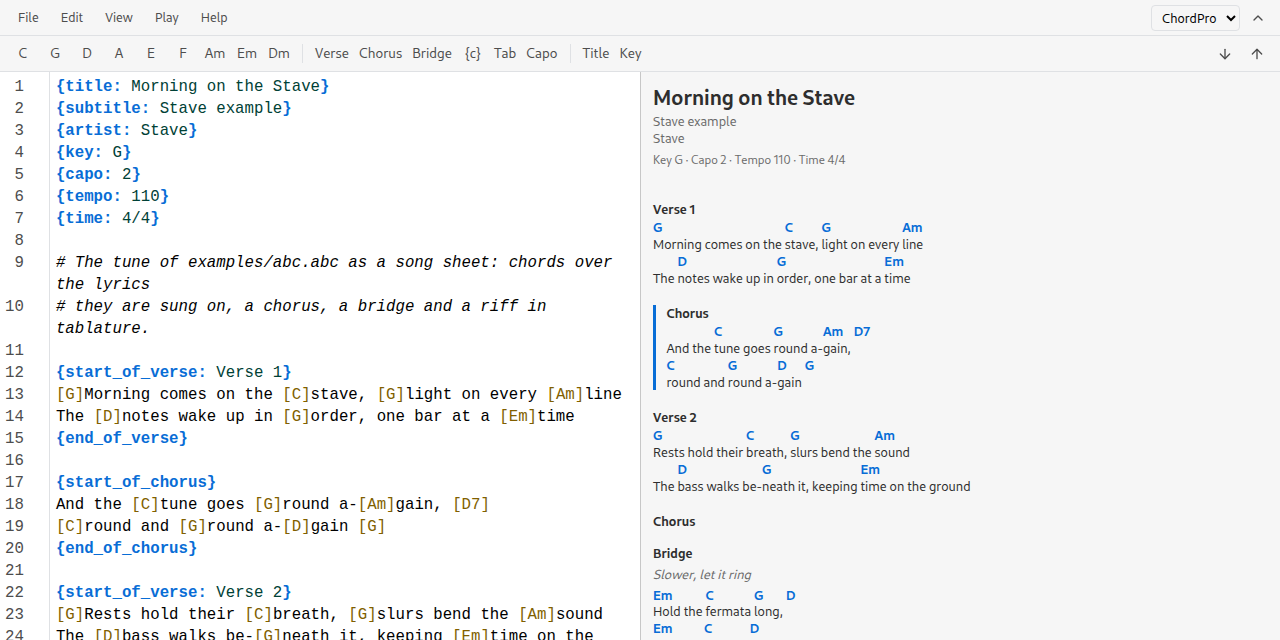
[G]Morning comes on the [C]stave. When rendered, the chord moves above the syllable. - Directives in braces, one per line, for metadata and structure.
The most common directives:
{title: ...}(or{t: ...}),{subtitle: ...},{artist: ...};{key: G},{capo: 2},{tempo: 110},{time: 4/4};{start_of_verse}and{end_of_verse}, and the same forchorusandbridge(with short forms such as{soc}and{eoc}); an optional label goes after the colon, as in{start_of_verse: Verse 1};{chorus}on its own repeats the last chorus;{comment: ...}(or{c: ...}) for directions such as “slower”;{start_of_tab}and{end_of_tab}for a stretch of ASCII tablature, kept as written.
Lines starting with # are file comments and are not shown.
Example
{title: Morning on the Stave}
{key: G}
{capo: 2}

{start_of_verse: Verse 1}
[G]Morning comes on the [C]stave, [G]light on every [Am]line
{end_of_verse}

{start_of_chorus}
And the [C]tune goes [G]round a-[Am]gain, [D7]
{end_of_chorus}
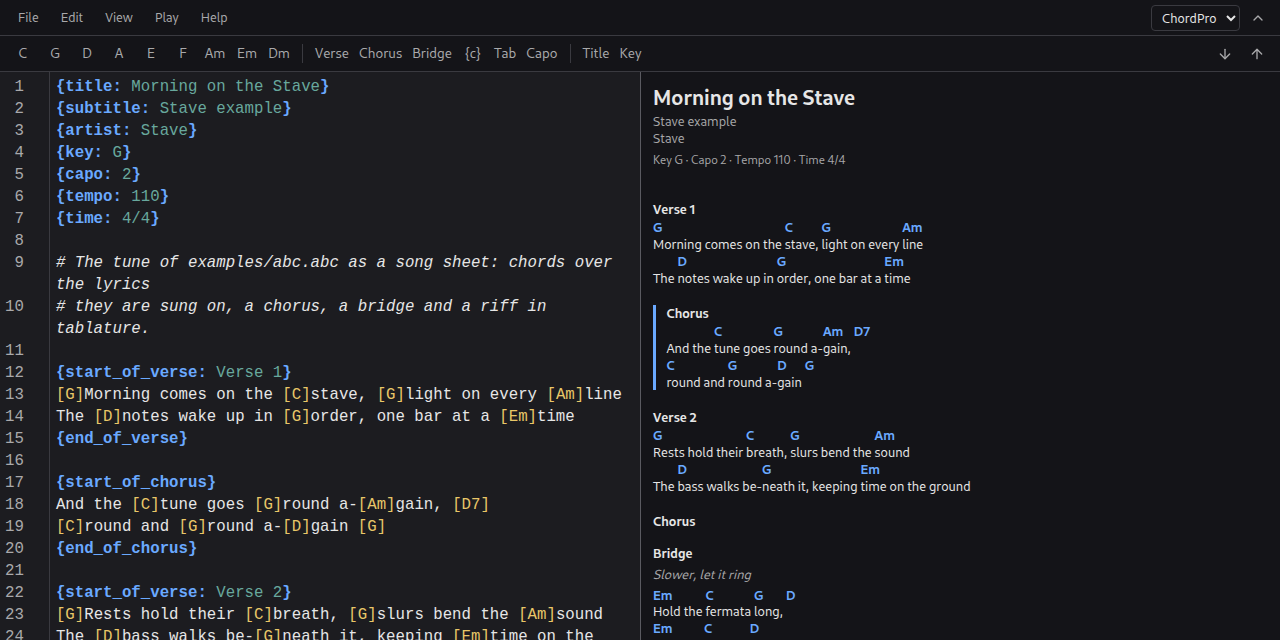
Without the plugin, the text is still a readable chord sheet. With it, the chords move above the lyrics, and transposing changes every chord and the {key} at once, bass notes of chords such as D/F# included.
Links
- chordpro.org, the official site
- Format specification, with the list of directives and the chord syntax
- ChordPro cheat sheet, every directive on one page
- ChordPro on GitHub, the reference implementation
alphaTex
Origin
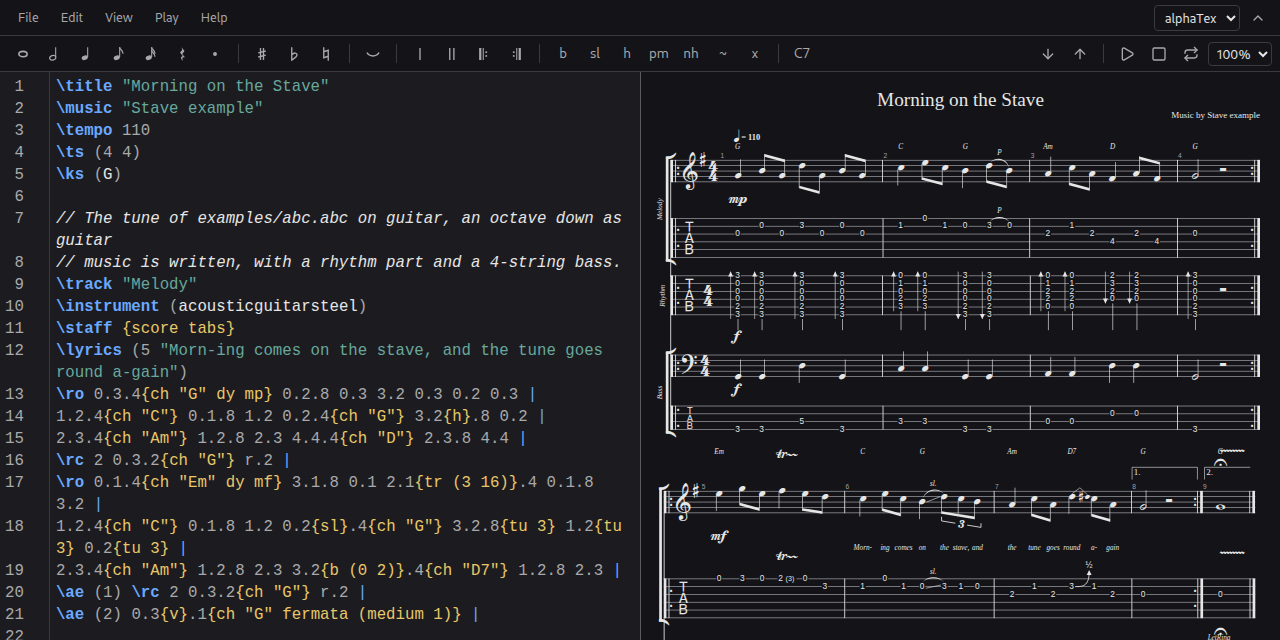
alphaTex is the text format of alphaTab, an open source library created by Daniel Kuschny to draw and play scores and tablature in the browser. alphaTab was made to open Guitar Pro files, and alphaTex is the way to write the same thing by hand. That is why it thinks like a guitarist: instead of naming the note, you say which fret and which string it is on.
It is the most complete of the three for string instruments: several tracks, their own tunings, techniques such as bends, slides, hammer-ons and palm muting. In Stave, it also imports MusicXML and Guitar Pro 3 to 7 files and exports to Guitar Pro 7.
Syntax
Metadata are backslash tags:
\title "...",\tempo 110,\ts (4 4)for the time signature and\ks (G)for the key;\track "Name"starts a track,\instrument (...)picks its sound for playback;\staff {score tabs}shows the score, the tablature or both;\tuning (G2 D2 A1 E1)sets the tuning, from the highest string to the lowest (here, a 4-string bass).
Notes follow the fret.string.duration form:
0.6.4is the open 6th string (the low E on a guitar) as a quarter note. Strings are counted from the top: 1 is the highest.- The duration is the denominator:
1whole,2half,4quarter,8eighth,16sixteenth. It holds until it is changed, so0.6.8 0.6 3.6are three eighth notes. ris a rest:r.2.- Notes in parentheses sound together, as a chord:
(0.6 2.5 2.4).4. *4repeats the previous beat four times.|separates bars;\roand\rc 2open and close a repeat played twice.- Effects go in braces, after the note or the beat:
{h}hammer-on,{sl}slide,{b (0 4)}bend,{pm}palm mute,{v}vibrato,{ch "G"}chord symbol. //starts a comment.
Example
\title "Morning Riff"
\tempo 96
\track "Guitar"
\staff {score tabs}
0.6.8 0.6 3.6 0.6 5.6.4 3.6.8 5.6 | (0.6 2.5 2.4).4{ch "E5"} 7.3{b (0 4)}.4 r.2
\track "Bass"
\tuning (G2 D2 A1 E1)
\staff {tabs}
0.4.4 0.4 3.4 0.4 | 0.4.2 r.2
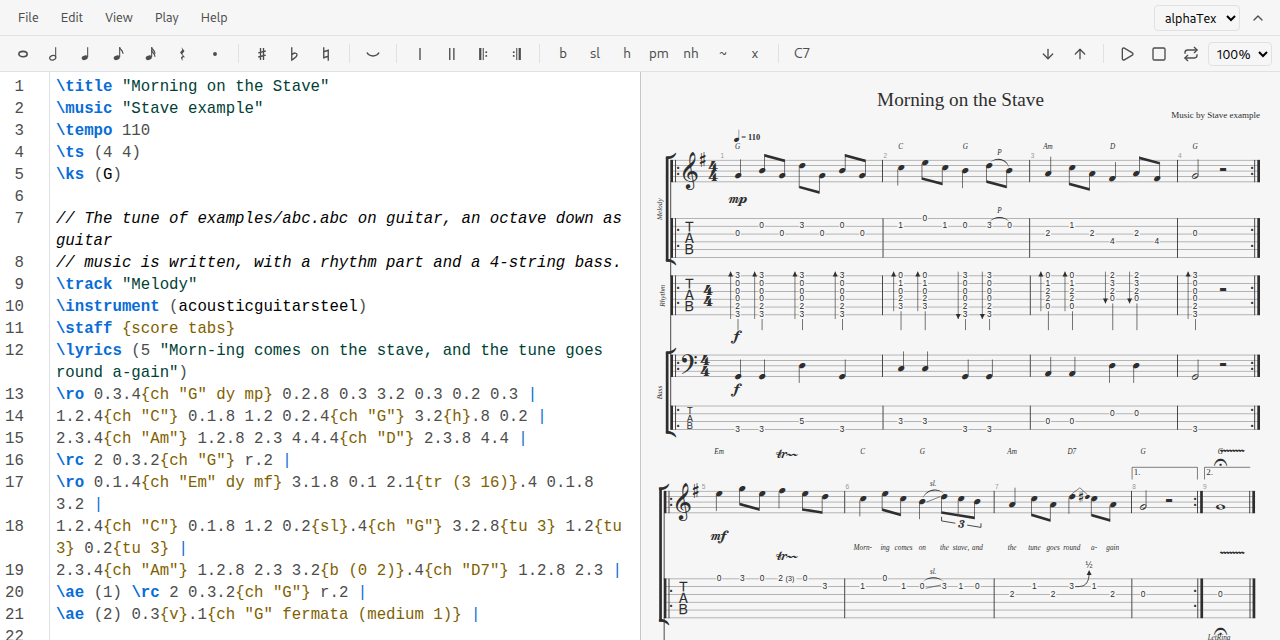
Two tracks: a guitar with a riff on the low string, an E power chord and a whole-step bend, and a 4-string bass along with it. It is less readable than ABC for someone who does not play, but for anyone who already reads tablature the translation is direct.
Links
- alphatab.net, the alphaTab site
- Introduction to alphaTex, the format documentation
- Syntax and document structure, the grammar of the format
- The reference pages, which work as a cheat sheet: score metadata, staff metadata, bar metadata, beat properties and note properties
- alphaTab on GitHub
Which one to use
All three store music as text, but each answers a different question:
- ABC asks “which notes?”. It names pitch and duration, like a score. It is the best fit for melodies, traditional music and anything read on a staff.
- ChordPro asks “which chords, on which word?”. It has no rhythm and no notes, only lyrics and harmony. It is the best fit for chord sheets and songbooks.
- alphaTex asks “where do my fingers go?”. It names fret and string, with guitar techniques and several tracks. It is the best fit for tablature, riffs and band arrangements.
The full example of each format, in Stave’s File menu, is the same tune written in all three, which makes comparing them much easier.
How Stave was built
Stave is a single page written in TypeScript with React 18, built with Vite. Standard Notes loads it in an iframe, and the page talks to the app through the Standard Notes component relay: it receives the note, saves the text back (with a short delay that merges fast edits into one save) and keeps the layout preferences in the plugin’s own data, never in the note. The interface reuses the patterns of the Milkdown plugin, and every color comes from the Standard Notes theme variables, so all themes work without code of their own.
One editor, three engines
The core of the project is a TypeScript interface, Engine, and the UI only talks to the notations through it. Each engine:
- detects its own text (the rules from the installation section);
- gives a template, a full example and a cheat sheet;
- turns toolbar actions, written in neutral terms such as “a quarter note” or “a repeat start”, into an edit of the source in its own syntax;
- brings a CodeMirror 6 language (a
StreamLanguagefor highlighting and an autocompletion of header fields, tags or directives); - mounts a renderer that reports errors with line and column, maps clicks in the drawing back to the source and, when it can, offers a player, transposition and export.
A registry lists the three engines, and it is the only file that knows they exist. Each renderer is loaded with a dynamic import(), so Vite puts it in its own chunk: opening the editor loads React, the UI and CodeMirror, and someone who only writes ChordPro never downloads abcjs or alphaTab.
The ABC engine
ABC is drawn and played by abcjs 6, an MIT library written in JavaScript. renderAbc draws SVG, and its click listener gives the character offsets of each note, which is how a click in the score selects the text. Playback uses the abcjs synthesizer with TimingCallbacks to move the cursor, MIDI export uses getMidiFile, and transposition uses strTranspose, which rewrites the source and the key signature. The abcjs synthesizer fetches its samples from a CDN by default, so Stave ships the Fluid R3 GM piano samples in the build and points the synthesizer at them.
Verovio, a WebAssembly engraver with better looking output, was measured and left out: 2.3 MB gzip against 146 KB for abcjs, no support for several voices in its ABC importer, and no link from the drawing back to the source text.
The alphaTex engine
alphaTex runs on alphaTab 1.8, an MPL-2.0 library written in TypeScript. Its AlphaTexImporter parses the text and gives the diagnostics with their position; Stave wraps one step of the importer to note the source range of each beat, which is what makes clicks and the cursor highlight work. The score is drawn as SVG on the main thread with the Bravura music font. MIDI export goes through alphaTab’s MidiFileGenerator, Guitar Pro 7 export through its Gp7Exporter, and the MusicXML and Guitar Pro import goes through ScoreLoader and then AlphaTexExporter, which writes the alphaTex into the note. Transposition is Stave’s own code, since it has to move frets to another string when they leave the neck.
Playback was the hardest part. alphaTab plays through a worker (the synthesizer) and an audio worklet, but Standard Notes loads plugins in an iframe with an opaque origin, where a worker cannot start from the plugin’s URL. Vite builds alphaTab’s player as a single classic script with no imports; on the first Play the page fetches it and starts the worker from a blob of its text, then loads the Sonivox SoundFont.
The ChordPro engine
ChordPro has no library at all. ChordSheetJS, the usual JavaScript one, is GPL-2.0-only and cannot be combined with an AGPL-3.0 plugin, so Stave has its own parser in TypeScript. It reads the text line by line into a list of items (lyrics split into chord and syllable segments, directives, sections, comments, tablature), each with its source offsets, and reports unknown directives and unclosed chords or sections as errors. The renderer builds the sheet as HTML with DOM calls and puts the note’s text in through textContent, never as markup, so nothing in a note can inject code. Transposition shifts every chord, bass notes included, and the {key} directive.
Security, offline and tests
A Vite plugin adds a Content Security Policy to the build: scripts only from the plugin’s own origin, no inline code, no eval, connections only to the plugin’s origin and workers only from blobs. Fonts, SoundFonts and samples ship with the build, so the editor keeps working offline, like the app. Every dependency comes from the npm registry, and the component relay, which had a fix only on GitHub, is vendored in the repository with its license.
The tests use Vitest, Testing Library and fast-check for unit and property tests, and Playwright for end-to-end tests that load the plugin in a mock of the web and mobile apps, play music, check the CSP and run axe-core against WCAG 2.1 AA.
The current version is v1.2.0, AGPL-3.0 licensed. The code is at github.com/Esl1h/StandardNotes-Stave.