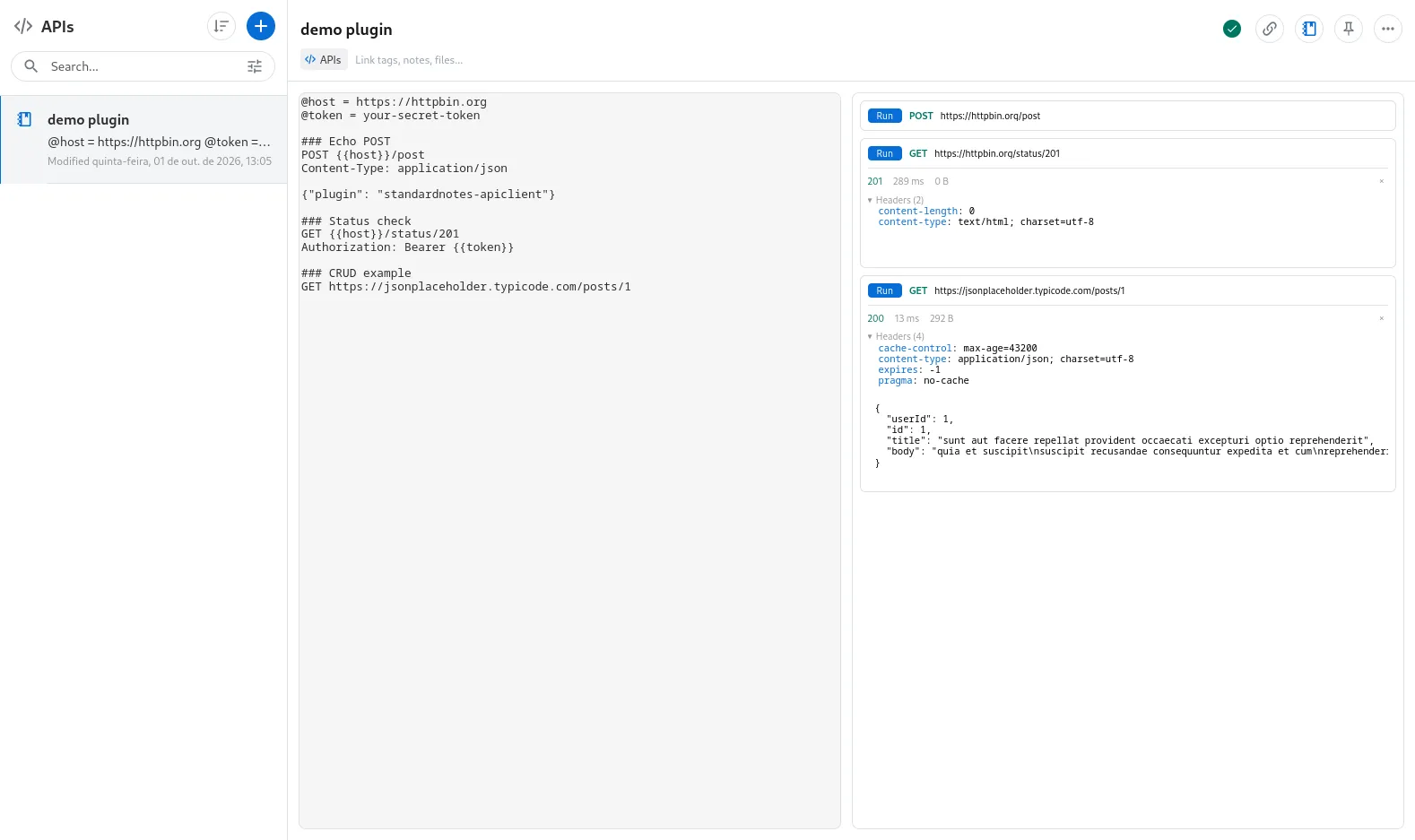
Also available in Portuguese: Um cliente de API dentro do Standard Notes, com sintaxe .http e criptografia ponta a ponta.
I have used Standard Notes since April 2024, as I wrote in Hora do café #3 (in Portuguese). It is a free, open source, end-to-end encrypted notes app, and you can extend it with custom editors.
StandardNotes-APIclient is one of those editors: an HTTP API client where the requests live in the body of the note, as plain text. Tokens, payloads and variables inherit the end-to-end encryption of the rest of your data, something web-based REST clients usually do not offer.
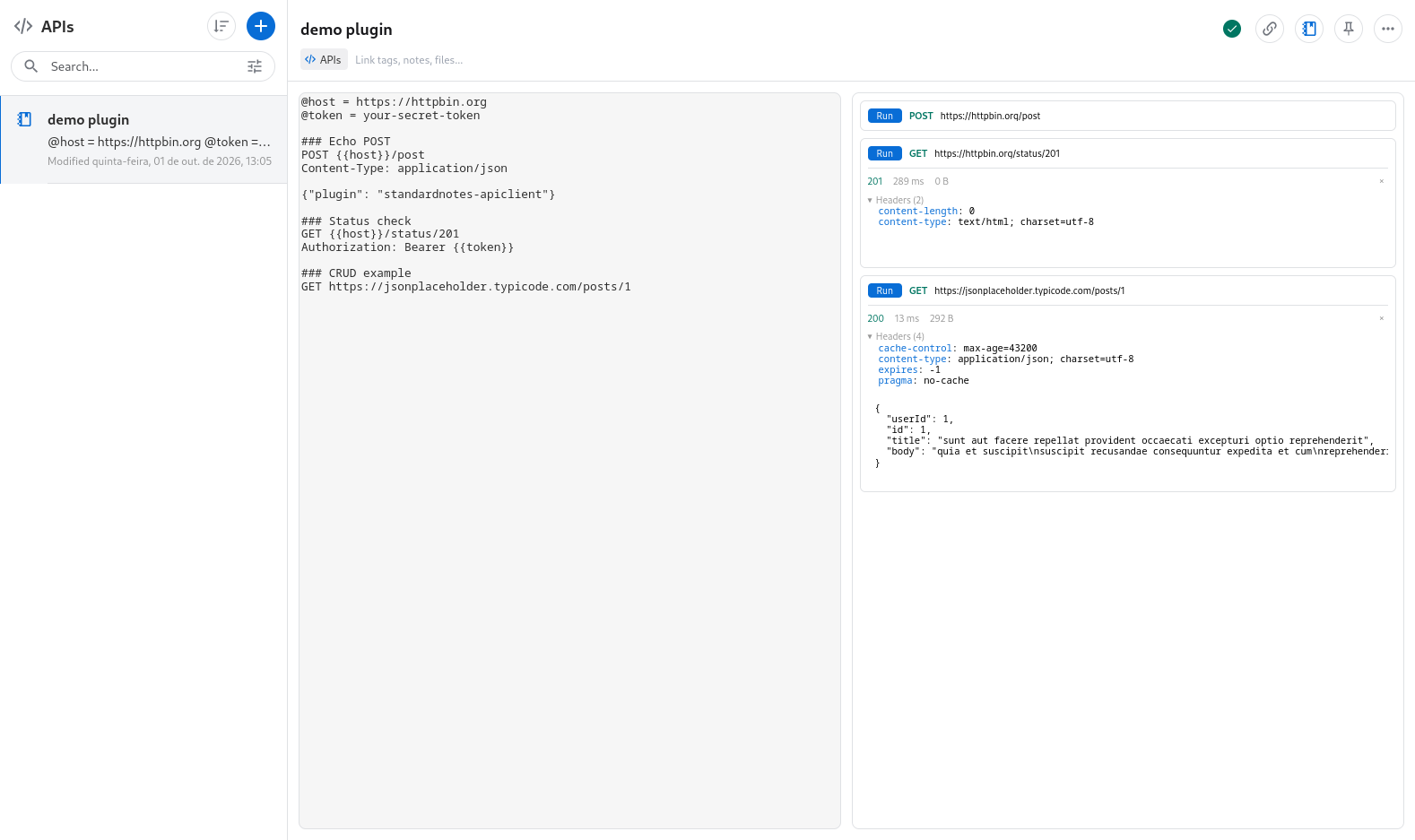
How it works
The format is .http, the same one used by the VS Code REST Client and kulala.nvim. The whole note is a file like this:
@host = https://httpbin.org
@token = your-secret-token

### Echo POST
POST {{host}}/post
Content-Type: application/json

{"plugin": "standardnotes-apiclient"}

### Status check
GET {{host}}/status/201
Authorization: Bearer {{token}}
Each ### Title opens a block. Variables are declared with @name = value and used as {{name}}, and a variable can reference earlier ones. Environments live in the file too: @name.staging = value sets the value for staging, and @env = staging picks the active one. In the variable list, values whose names contain token, secret, key, password or auth stay masked until you press show.
The Run button on each block executes only that request, and the response renders right below it: color-coded status, elapsed time, body size, collapsible headers and the body. Images are previewed and other binary responses can be downloaded. Responses stay in memory only and are never written to the note, so a run never changes the note text. Ctrl/Cmd+Enter in the source runs the request under the caret.
Since it is all text, the global Standard Notes search finds a request by its URL, a header name or the block title, without opening the editor. And an export of the note stays readable in any other client that speaks .http.
Chaining and checks
Requests can feed each other. A # @name login line labels a request, and once it has run, later requests can read from its recorded response: {{login.response.body.$.json.token}} takes a field (a JSONPath subset: $, .field, [index] and [*]) and {{login.response.headers.X-Token}} takes a header. References resolve at run time and are never written into the note.
### Login
# @name login
POST {{host}}/post
Content-Type: application/json

{"token": "abc123"}

### Use the token
GET {{host}}/bearer
Authorization: Bearer {{login.response.body.$.json.token}}
# @assert status == 200
# @assert body.$.token exists
Run all runs every request in file order, waiting for each one so a chained request reads the response of the one before it, and stops at the first failure.
The # @assert lines, in the style of kulala.nvim, are checked against the response and shown as passed or failed. The left side can be status, headers.<name>, body or body.$.path, and the operators are ==, !=, >, <, >=, <=, exists and not exists. A malformed assertion never passes silently.
Dynamic variables are generated on every run and never saved: {{$uuid}}, {{$timestamp}}, {{$randomInt 1 10}} and {{$datetime}}.
A few smaller things. Copy as cURL on a block copies the request as a curl command, with the variables already resolved and every value shell-quoted. A block warns about unresolved variables and about headers a browser never sends, such as Host or Cookie. The blocks can be reached from the keyboard, with Tab and the arrow keys.
Installation
-
In Standard Notes (web or desktop), open Preferences, then Plugins.
-
At the bottom of the page, paste the URL below into Install Custom Plugin:
https://esli.cafe/StandardNotes-APIclient/ext.json -
Create a note, open the Editor menu and pick API Client.
An empty note shows an Add sample button that fills it with example requests against httpbin.org and jsonplaceholder. If you just want to see it working, there is an online demo, no install needed. There the text is kept in your browser’s localStorage.
Limits
Requests leave from the browser (or the desktop app), so only endpoints with CORS enabled answer straight from the editor. For the rest, the README lists a local proxy companion as planned, and it has not shipped yet. Until it does, you need an endpoint that sends the CORS headers.
Running a request does send the described request to the target endpoint, of course. Beyond that, nothing is stored or transmitted anywhere else.
The plugin is at v0.5.2, AGPL-3.0 licensed, and the code is at github.com/Esl1h/StandardNotes-APIclient. It is built on Standard Notes’ editor-kit.