Also available in Portuguese: dnsbench: qual DNS é mais rápido na sua conexão, e para qual CDN ele te manda.
Every public DNS ranking answers the same question: which resolver is fastest, on average, as seen from datacenters around the world. My question is different: which one is fastest from my link, on my ISP, right now, and does it then send me to the right CDN edge?
Almost nobody measures that second part. A resolver that wins by 2 ms on lookup and loses by 90 ms on edge selection has lost, even while leading the table. That is why I wrote dnsbench.
What it is
A single static binary, with no runtime dependencies, no telemetry and no traffic beyond the measurement itself. It has a CLI and a full-screen TUI (--tui).
It is written in V, a language I covered in the introduction to V and in the from Bash to V guide, both in Portuguese. The documents in docs/ were written before the code and describe the finished tool. When code and document disagree, the code is the bug.
What it measures
Nine probes, picked with --probes: cached lookups (warm), tcp, forced cold cache (cold), CDN edge penalty (ecs), fresh DoT handshake versus a reused connection (dot-fresh and dot-warm), doh, dnssec (which resolvers actually validate) and filter (a measured ad-filtering verdict). The transports are UDP, TCP, DoT and DoH. DoQ waits for QUIC in V.
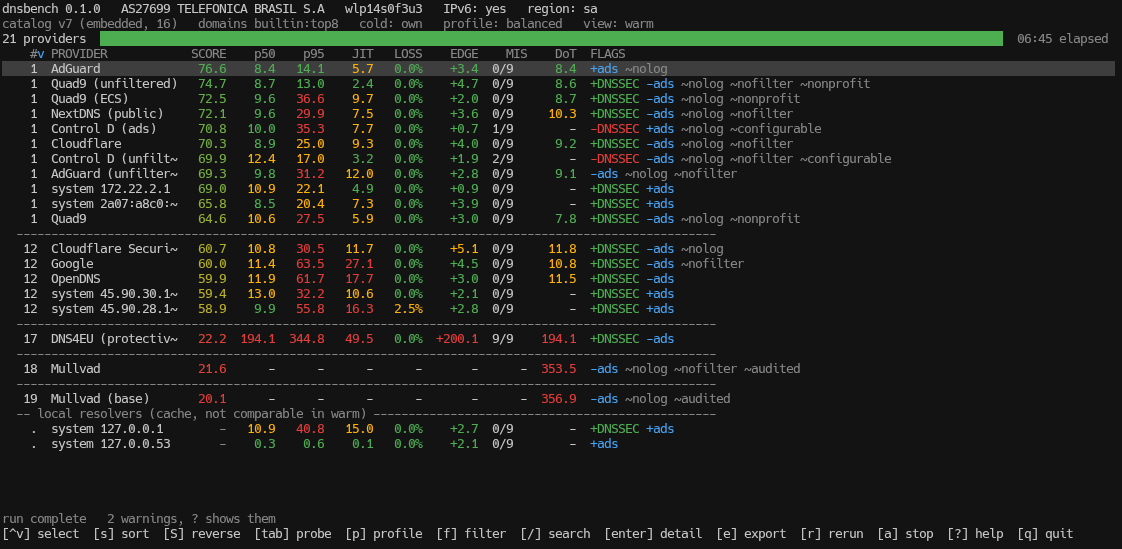
This is the full battery on my connection. The EDGE column is the CDN penalty. Local resolvers sit apart at the bottom, labelled as cache and left out of the comparison. In the flags on the right, +DNSSEC and -ads are measured by the probes. The ones starting with ~, like ~nolog, are just the provider’s own claim: dnsbench repeats it, it does not verify it.
Usage
dnsbench --tui --probes warm,cold,ecs,dot-warm,dnssec,filter
dnsbench --format json
dnsbench --watch 15m --history ~/.local/share/dnsbench/runs.jsonl --only quad9,cloudflare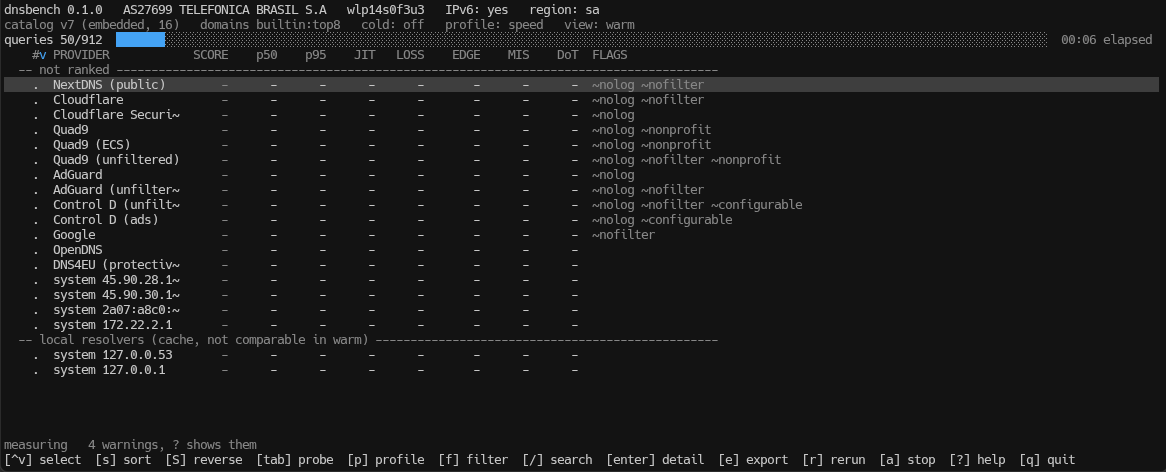
The table fills in while the run happens. s sorts, tab switches the probe behind the latency columns, / searches, enter opens a provider’s detail view and e exports. With p I cycle the weight profile and the ranking changes without measuring anything again, which is the honest way to show how much of a result is network and how much is weighting.
Design choices
- It refuses to run while a tunnel interface is up, because it would be measuring the tunnel and not the link. If you live on a VPN, like WireGuard, you will run into this.
--forceoverrides it and says so in the output. - History is JSONL and never mixes different networks. A fibre run and a mobile run on the same machine do not get averaged into one meaningless number.
- The
coldprobe uses a zone of its own,probe.dnsbench.esli.blog, with anycast and a point of presence in São Paulo. If it is unreachable, dnsbench falls back to random labels and stamps the run as not comparable. - The DNSCrypt catalog is optional and minisign-verified. It is never the default: the list itself warns that some entries censor or monetise queries. If the subject is new to you, start with Encrypted DNS: The Guide, which covers DNSCrypt, DNS Stamps and the Linux setup.
It also does not change your system’s DNS. It measures and reports, and the decision is yours.
Installation
Static binaries (amd64 and arm64) are on the releases page, with SHA256SUMS.
If you prefer to build from source, you need V 0.5.2 or newer:
git clone https://github.com/Esl1h/DNSbench && cd DNSbench
make build
make install
The current version is v0.2.1, MIT licensed. The full guide is docs/USAGE.md and the code is at github.com/Esl1h/DNSbench.