
Also available in Portuguese: Do WAF ao contrato da API: Coraza, nginx e CRS num laboratório testável.
Every API needs a WAF. Few teams can answer, with evidence, two simple questions: “which rule blocked this request?” and “did it reach the backend or not?”. This post describes a lab that answers both, rule by rule, with automated tests.
The lab has three pieces:
- a deterministic API simulator, with synthetic data and an endpoint that proves what reached it;
- OWASP Coraza, a ModSecurity-compatible WAF written in Go, loaded inside nginx as a module, with the OWASP CRS and one plugin;
- a set of commented custom rules, a catalog, diagrams and a test suite that checks status and arrival for each case.
Everything is at github.com/Esl1h/coraza-apilab and runs locally with Docker.
Contents
- Part 1: the API simulator
- Part 2: Coraza
- Part 3: the lab
- Architecture and diagrams
- Layers: who answers what
- Running the all-in-one
- Running the split layout
- Rule load order
- Rule catalog
- 100: who is talking (100-edge-network.conf)
- 110: does the HTTP make sense for this API (110-protocol.conf)
- 120: who claims to be talking (120-user-agent.conf)
- 130: what is being asked for (130-uri.conf)
- 140: the API contract (140-api-contract.conf)
- 150: credentials (150-auth.conf)
- 160: what comes inside (160-payload.conf)
- 190 and 900: exclusions (190-runtime-exclusions.conf, 900-config-exclusions.conf)
- 910: what the API returns (910-response.conf)
- Tests: proof of arrival
- Writing a new rule
- Tuning: real false positives
- What broke along the way
- Numbers
- Conclusion
Part 1: the API simulator
To test a WAF you need a backend that behaves like a real corporate API (login, CRUD, search, upload, webhook, GraphQL, admin routes) but has nothing to lose. That is why the simulator exists, in two implementations with the same contract:
- rs-http-apilab, in Rust with axum;
- v-http-apilab, in V with veb.
Both have the same endpoints, the same environment variables, the same error envelope and the same curl test suite. Running the binary opens the port right away: no database, no migrations, no config file. Restarting brings back the initial state.
What it simulates
- Infra:
/health,/ready(can be forced to 503),/version,/metricsin Prometheus format. - Simulated authentication:
POST /api/v1/auth/loginreturns a Bearer token;/auth/meand/auth/logoutrequire it. - Resources: users (full CRUD), search, reports with CSV download, tickets, an urlencoded form.
- Integrations: a webhook receiver (accepts any Content-Type and returns only a summary) and a GraphQL stub.
- Files: multipart or octet-stream upload (never written to disk) and an allowlist of static files.
- Administration:
/admin/status,/admin/config(validates and echoes, never applies) and/internal/debug. - Lab utilities:
/lab/echo(reflects method, path, query and some headers),/lab/slow?ms=,/lab/status/{code},/lab/large?bytes=,/lab/stream,/lab/headersand/lab/response-marker, which returns a fixed marker to test response inspection.
Every error has the same shape:
{"error":{"code":"...","message":"...","request_id":"..."}}What makes the lab work: /lab/calls
The simulator keeps in memory the last 200 requests that reached it. Start it with LAB_ADMIN_TOKEN and tag each request with an X-Test-Case header:
LAB_ADMIN_TOKEN=lab-secret ./rs-http-apilab-linux-amd64

curl -H 'X-Test-Case: case-42' 'http://127.0.0.1:8080/api/v1/search?q=security'

curl -H 'X-Lab-Token: lab-secret' http://127.0.0.1:8080/lab/calls |
  jq '.calls[] | select(.x_test_case == "case-42")'
If the case shows up in the buffer, the request reached the backend. If it does not, something in the middle cut it off: a proxy, a WAF, a firewall, a timeout. With the WAF in front, that absence is the proof that the block really happened.
Downloading the binary
Both projects publish the binary on every release, with SHA256SUMS:
gh release download v1.0.0 --repo Esl1h/rs-http-apilab
sha256sum -c SHA256SUMS
chmod +x rs-http-apilab-linux-amd64
LAB_ADMIN_TOKEN=lab-secret ./rs-http-apilab-linux-amd64   # 0.0.0.0:8080
Replace rs with v to use the V version. The binaries are dynamically linked against glibc 2.36 or newer (Debian bookworm onwards).
Getting openapi.json
The full OpenAPI 3.0.3 specification is embedded in the binary and served in two places:
GET /openapi.json: the raw document;GET /docs: Swagger UI pointing at it (the UI assets come from a CDN; the API itself does not need internet access).
To save the file:
curl -s http://127.0.0.1:8080/openapi.json -o openapi.json
jq '.info, (.paths | keys)' openapi.json
The same works through the lab’s WAF (http://localhost:8080/openapi.json in the all-in-one, :8090 in the split layout).
Exploring with Bruno or Restfox
With openapi.json in hand, the best way to explore the API by hand is to import the specification into an API client. I recommend two, both open source and local (no cloud account to store your collections):
- Bruno: stores collections as text files on your disk, so they go into Git together with the project. Import them under Import Collection, choosing the OpenAPI specification (file or URL). Every route becomes a ready request, with an example body.
- Restfox: lightweight, runs as a desktop app or straight in the browser, and also imports OpenAPI. Great for a quick look without installing anything.
Tips for using both against the lab:
- Create a
baseUrlenvironment variable set tohttp://localhost:8080(all-in-one) orhttp://localhost:8090(split) and switch freely between the bare simulator and the simulator behind the WAF. - Log in, copy the
tokenfrom the response and use it as Bearer on the protected routes. - Add the
X-Test-Caseheader to the requests you want to track in/lab/calls. - Note that the WAF blocks the login when the User-Agent belongs to a bare HTTP library (
axios/,python-requests,Go-http-client…), rule 10210. Bruno identifies itself asbruno-runtime/...and gets through; if your client is refused at login, that is the rule at work.
Part 2: Coraza
What it is
OWASP Coraza is a WAF engine written in Go, compatible with the ModSecurity rule language (SecLang) and with the OWASP CRS. It is a library: you embed it in a server or proxy through a connector. The most common connectors are for Caddy, Envoy/Proxy-Wasm, HAProxy (SPOA) and, the one used here, nginx.
The nginx chain has three parts:
- coraza: the Go engine;
- libcoraza: the engine exported as a shared C library (
libcoraza.so); - coraza-nginx: the nginx dynamic module that talks to libcoraza.
libcoraza is loaded with dlopen() inside each worker, after the fork, and that will matter later. A Go runtime does not survive a fork, so each worker starts its own runtime and compiles its own rule set.
How a transaction is evaluated
Every request becomes a transaction that goes through five phases:
- Request headers: method, URI, query, headers, client IP.
- Request body: the body, already parsed by the right processor (JSON, urlencoded, multipart, XML or RAW).
- Response headers.
- Response body.
- Logging: always runs, even after a block.
Inside each phase, rules run in the order they were loaded. A rule has variables (where to look), an operator (what to look for), transformations (how to normalize first) and actions (what to do):
SecRule REQUEST_HEADERS:User-Agent "@pmFromFile bad-user-agents.txt" \
    "id:10200,phase:1,deny,status:403,log,t:none,t:lowercase,\
    msg:'Attack tool User-Agent',severity:'CRITICAL'"
Two ways to decide: deny and anomaly scoring
- Direct block (
deny): the rule decides alone. Good for certain policy: an IP on the denylist, a route that does not exist, a wrong Content-Type. - Anomaly scoring: the CRS model. An attack rule does not block; it adds points (critical 5, error 4, warning 3, notice 2). At the end of the phase, rule 949110 compares the total with the threshold (5 by default) and blocks if it is reached. One strong signal blocks alone, several weak signals add up. That is what makes CRS tunable without editing rules.
Paranoia levels
CRS splits its rules into paranoia levels (PL1 to PL4). PL1 has few false positives; each level above catches more and needs more tuning. You can block at one level and detect at another: in the lab we block at PL1 and log up to PL2, so the audit log shows what raising the level would catch before you pay for its false positives.
CRS plugins
CRS has a plugin mechanism: each plugin brings *-config.conf, *-before.conf and *-after.conf files, loaded before and after the CRS rules, in a reserved ID range (9,500,000 to 9,999,999). There are exclusion plugins for well-known applications (WordPress, Nextcloud…), hardening plugins and integration plugins.
Not every plugin runs on Coraza. I evaluated a few:
- referer-hardening: validates the
Refererheader and inspects its parts with the CRS rules. Used in the lab, with a workaround I explain later. - auto-decoding: uses
t:sqlHexDecode, which Coraza does not implement. It does not load. - fake-bot: depends on Lua, which Coraza does not have.
- dos-protection: depends on persistent per-IP collections.
What Coraza does not do
- State across requests: Coraza v3 accepts
initcol, but the action does nothing; there are no persistent collections. Rate limiting and brute-force protection stay in nginx (limit_req). - Lua (
SecRuleScript). - GeoIP without a geo database plugin compiled into libcoraza.
- PCRE regex: Coraza uses Go’s RE2, with no lookahead and no backreferences.
In exchange, it has operators that ModSecurity does not, and they make a big difference for APIs:
@restpath: matches a route template (/api/v1/users/{id}) and puts the placeholders inARGS_PATH, so a path segment can be validated like an argument;@validateSchema: validates the JSON body against a JSON Schema.
Part 3: the lab
The coraza-apilab repository puts all of this together in two layouts. Versions used, all pinned and verified by sha256 at build time:
- nginx 1.30.5 (official image, Debian trixie);
- coraza-nginx v0.22.0 and libcoraza v1.8.0;
- Coraza engine v3.8.1 (libcoraza 1.8.0 ships 3.7.0; the build upgrades it because 3.8.1 is a security release);
- OWASP CRS v4.25.2 (LTS line);
- the referer-hardening plugin, pinned by commit;
- the v1.0.0 binaries of rs-http-apilab and v-http-apilab.
Architecture and diagrams
The diagrams below were generated from the Mermaid in the repository. The source of each one, rendered by GitHub, is in these links:
All-in-one: nginx, Coraza and the API binary in the same container. The API listens on 127.0.0.1:9000 and the port is not published; the only way in is nginx. A second port, 8081, loopback only, serves the health check and stub_status without the WAF: a health probe must never be blocked by a false positive.

Split: the WAF and the API in separate containers. The API sits only on an internal: true network: no published port, no route to the internet (which limits the damage of an SSRF) and a read-only container with no capabilities. This is the layout you would use in production, as two services or as a sidecar in the same pod.

Request lifecycle. Note the order: nginx drops malformed HTTP before Coraza; realip resolves the real IP; Coraza phase 1 runs before the rate limit; and response inspection holds the headers until the body is inspected, so it can still replace the response with a 403 if it finds a leak.
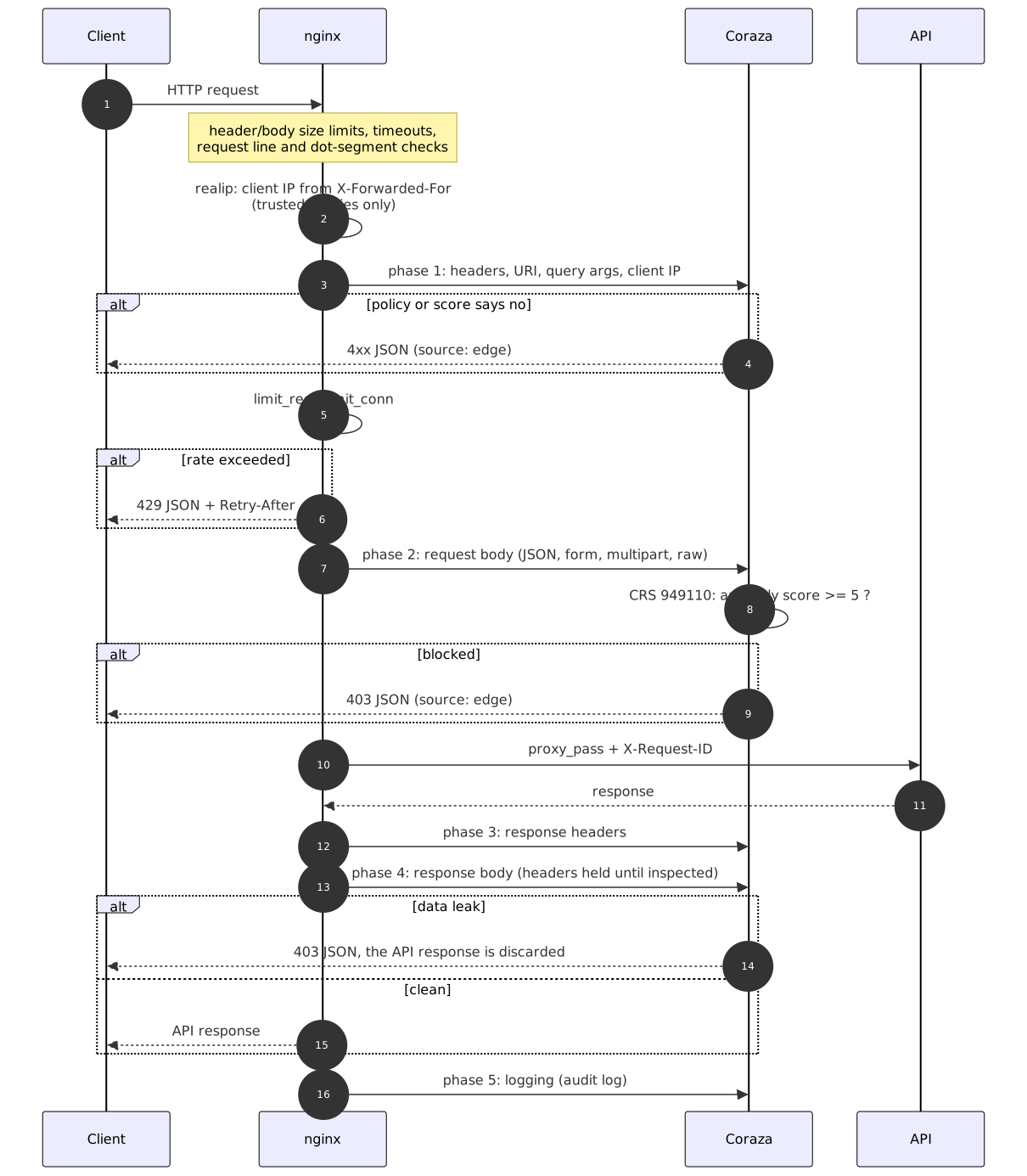
Layers: who answers what
A WAF is one layer, and the lab keeps each control where it works best:
| Problem | Who handles it |
|---|---|
| Slow client (slowloris, slow POST) | nginx timeouts |
| Huge header or request line | nginx buffers (400/414) |
| Body above 8 MiB | nginx client_max_body_size (413) |
| Body above 2 MiB | Coraza SecRequestBodyLimit (413) |
| Body above 1 MiB | API MAX_BODY_BYTES (413 with the API envelope) |
| Real IP behind a proxy | nginx realip |
| Rate limiting, brute force | nginx limit_req/limit_conn (429) |
| IP reputation, ACL, Host, methods | lab rules in Coraza |
| API contract | lab rules in Coraza |
| Generic attacks (SQLi, XSS, RCE, LFI, SSRF…) | OWASP CRS |
| Leaks in the response | lab rules + CRS 95x |
| Authentication | the API itself |
The three size limits are deliberately decreasing, so the response tells you who answered. Every response generated at the edge (nginx or Coraza) uses the API envelope with one extra field, "source":"edge":
{"error":{"code":"waf_blocked","message":"request blocked by the WAF","source":"edge","request_id":"5617d4e0..."}}The same request_id shows up in the nginx access log, in the Coraza audit log (it is the transaction id, through coraza_transaction_id $request_id) and in the API log (sent as X-Request-ID). One id, three logs.
Running the all-in-one
Requirements: Docker with Compose v2, make, curl and bash; jq for explain. The first build downloads and compiles libcoraza and the nginx module, so it takes a few minutes.
git clone https://github.com/Esl1h/coraza-apilab
cd coraza-apilab

make allinone-up            # http://localhost:8080, Rust simulator
make test-allinone          # 184 checks
make explain-allinone       # which rules decided each case
make audit                  # follows the Coraza audit log
make allinone-down
To use the V simulator, set the variable:
APILAB=v make allinone-upUnder the hood, docker/allinone-entrypoint.sh starts the API as an unprivileged user, waits for it to answer and only then starts nginx. If either process dies, the container exits and the restart policy brings both back, instead of leaving nginx answering 502 forever.
Try it by hand:
curl -s localhost:8080/api/v1/users/1                        # 200, reaches the API
curl -s "localhost:8080/api/v1/search?q=1'+UNION+SELECT+1--"  # 403, SQLi caught by CRS
curl -s localhost:8080/api/v1/users/abc                      # 400, contract via @restpath
curl -s localhost:8080/.env                                  # 404, "never existed"
curl -s localhost:8080/lab/response-marker                   # 403, leak caught in the response
Running the split layout
make split-up               # http://localhost:8090
make test-split
make explain-split
make split-down

APILAB=v make split-up      # with the V simulator
The two examples use different ports (8080 and 8090) and can run at the same time. make down stops both. To check the isolation of the internal network:
docker exec coraza-apilab-api curl -s -m3 https://example.com # fails: no way outRule load order
nginx loads a single file, coraza/main.conf, which fixes the order documented by CRS:

coraza.conf: how to inspect. Body access, processor per Content-Type (JSON, XML, RAW for binary and text), size and argument limits, JSON depth (32), response inspection, JSON audit log.crs-setup.conf: block at PL1, detect at PL2, anomaly threshold 5, early blocking, allowed methods, Content-Types and HTTP versions, argument limits sized to the API contract.- and 4. Plugins: configuration and “before” rules.
rules-before/: the lab rules, from the cheapest and most certain to the most expensive, plus the runtime exclusions (ctl:), which must run before the CRS rule they change.- CRS.
- Plugin “after” rules.
rules-after/: configure-time exclusions (SecRuleRemoveByIdand friends only work on rules already loaded) and response rules.
Every lab rule follows the same comment template: ID, phase, action, what it does and why.
# 10400 | phase 1 | deny 400
# /api/v1/users/{id}: positive integer, at most 9 digits.
SecRule REQUEST_FILENAME "@restpath /api/v1/users/{id}" \
    "id:10400,\
    phase:1,\
    deny,\
    status:400,\
    log,\
    t:none,\
    msg:'Invalid user id in path',\
    logdata:'id=%{ARGS_PATH.id}',\
    tag:'lab/api-contract',\
    tag:'lab/positive-model',\
    severity:'ERROR',\
    chain"
    SecRule ARGS_PATH:id "!@rx ^[1-9][0-9]{0,8}$" \
        "t:none"
Rule catalog
The full catalog is in docs/rules.md. Here is the commented summary, in the order Coraza evaluates it. The “Test” column is the case name in the suite.
This is the full evaluation flow, also from the repository:

100: who is talking (100-edge-network.conf)
Decisions that depend only on the IP and the route. They are cheap and run first.
| ID | Action | What it does | Test |
|---|---|---|---|
| 10000 | deny 403 | IP on the denylist (data/ip-denylist.txt) | ip-denylist |
| 10010 | engine off | GET/HEAD /health and /ready without a query skip the WAF; it comes after the denylist, so a banned IP does not even get probes | health |
| 10020 | deny 403 | /admin, /internal, /metrics and /lab/calls only from the admin network (the “VPN” 10.10.0.0/16) | admin-from-internet, admin-from-vpn |
| 10030 | DetectionOnly | Authorized scanner IP: everything is inspected and logged, nothing is blocked. A pentest produces findings in the audit log instead of a wall of 403s | trusted-scanner-sqli |
The IP comes from nginx realip, based on X-Forwarded-For. In the lab, nginx trusts the private ranges so the tests can choose the source IP. In production, set_real_ip_from lists only your load balancers; trusting a range that clients can reach lets anyone choose their own IP and walk past the allowlist, the denylist and the rate limit.
110: does the HTTP make sense for this API (110-protocol.conf)
| ID | Action | What it does | Test |
|---|---|---|---|
| 10100 | deny 400 | Host the API does not serve (cache poisoning, poisoned password reset links, routing to an internal vhost) | host-not-served |
| 10110 | deny 400 | More than 40 headers | too-many-headers |
| 10120 | deny 400 | Duplicated Content-Type, Authorization or Host: the WAF may look at the first one and the backend use the last | duplicate-content-type |
| 10130 | deny 405 | PUT, PATCH and DELETE outside the routes that accept them | delete-on-reports |
CRS adds the global method allowlist (911100, PROPFIND becomes 403), HTTP versions (920430, HTTP/1.0 becomes 403) and Content-Types (920420). TRACE never reaches Coraza: nginx itself returns 405.
120: who claims to be talking (120-user-agent.conf)
| ID | Action | What it does | Test |
|---|---|---|---|
| 10200 | deny 403 | Attack tools missing from the CRS list (ffuf, hydra, patator, katana…) | scanner-ffuf |
| 10210 | deny 403 | Default HTTP library User-Agent, only on the login route | library-on-login, library-elsewhere |
| 10220 | +3 points | No User-Agent | no-user-agent |
| 10230 | +2 points | No Accept | no-accept, no-ua-no-accept |
The 10220 and 10230 pair is the anomaly scoring example: each one alone passes (3 and 2 points, below the threshold of 5); together they add up to 5 and CRS blocks at rule 949110. Both are phase 2 because CRS rule 901200 resets the scores in phase 1, after the lab file has already run: points added in phase 1 before CRS are lost.
130: what is being asked for (130-uri.conf)
The positive model applied to paths: instead of listing bad URLs (impossible), describe the ones that exist.
| ID | Action | What it does | Test |
|---|---|---|---|
| 10300 | deny 414 | URI above 2048 bytes | uri-too-long |
| 10310 | deny 400 | %2f, %5c or double encoding in the path (ACL bypass and traversal) | encoded-slash |
| 10320 | deny 404 | Sensitive files: .git, .env, backups, dumps, keys | dotgit, backup-file |
| 10330 | deny 404 | Route outside the API inventory | dotenv, not-in-inventory |
| 10340 | deny 404 | Name under /static/ outside the allowlist | static-not-allowed |
Why 404 and not 403: a 403 confirms “there is something here and it is protected”; a 404 gives the scanner nothing to follow. Rule 10330 alone is the most effective against blind scanning, and it doubles as inventory documentation: a new route that is not declared there is unreachable.
140: the API contract (140-api-contract.conf)
This is where the WAF stops being “generic signatures” and becomes a contract enforcer: anything outside the OpenAPI contract is refused, whether or not a signature exists for that attack.
| ID | Action | What it does | Test |
|---|---|---|---|
| 10400 to 10403 | deny 400 | @restpath for /users/{id}, /tickets/{id}, /reports/{id}/download and /lab/status/{code}, validating the format of each segment | user-id-not-numeric, user-id-sqli, report-id-format, status-code-format |
| 10410, 10411 | deny 400 | Search: q up to 100 characters, limit from 1 to 50 | search-q-too-long, search-limit-range |
| 10420 | deny 400 | /lab/slow?ms= above 2000 (business-logic DoS: the API accepts 10 s) | slow-above-cap |
| 10421 | deny 400 | /lab/large?bytes= above 256 KiB (amplification) | large-above-cap |
| 10430 to 10432 | deny 415 | Content-Type per route: JSON, form, upload | json-route-wrong-ct, form-route-wrong-ct, upload-wrong-ct |
| 10440 to 10442 | deny 400 | @validateSchema on the user, ticket and login creation bodies | mass-assignment, role-not-in-enum, ticket-too-many-tags, login-extra-field |
The JSON Schemas use additionalProperties: false. It is the edge defense against mass assignment (OWASP API3:2023): a {"name":"x","is_admin":true} dies in the WAF before the backend has a chance to bind an unexpected field.
Note that user-id-sqli (/api/v1/users/1 OR 1=1) is blocked by the contract rule, not by the SQLi one: the id is not an integer. The positive model catches an attack without having to recognize it.
150: credentials (150-auth.conf)
The WAF does not authenticate anyone; that is the API’s job. It refuses malformed credentials early and keeps secrets out of its own log.
| ID | Action | What it does | Test |
|---|---|---|---|
| 10500 | deny 401 | Scheme other than Bearer (Basic, NTLM…) | basic-auth |
| 10510 | deny 401 | Bearer token outside the RFC 6750 alphabet or the expected length; the log records only the length | bearer-malformed |
| 10520 | deny 401 | /auth/me and /auth/logout without Authorization | me-without-token |
| 10530 | ctl | Removes the request body from the audit log on the login route (passwords) |
160: what comes inside (160-payload.conf)
CRS already covers the generic classes. These rules cover attacks specific to this API’s features.
| ID | Action | What it does | Test |
|---|---|---|---|
| 10600 | deny 403 | GraphQL introspection (__schema, __type) | graphql-introspection |
| 10610 | deny 403 | GraphQL alias batching (more than 20) | graphql-aliases |
| 10620 | deny 403 | SSRF: URLs to loopback, RFC 1918, link-local, local IPv6 or non-HTTP schemes in webhooks and /admin/config | ssrf-private, ssrf-metadata |
| 10630 | deny 403 | Upload with an executable or script extension | upload-php |
| 10640 | deny 403 | Template syntax ({{ }}, ${ }, <% %>) in free text of tickets and feedback | ssti-ticket |
| 10650 | deny 403 | Privilege fields (role, is_admin…) in /admin/config | admin-config-role |
The cases left to CRS: SQLi (942xxx, including libinjection), XSS (941xxx), RCE (932xxx), LFI (930xxx), prototype pollution (934130), Log4Shell (944xxx), known scanners (913100) and the plugin’s invalid Referer (9524110).
190 and 900: exclusions (190-runtime-exclusions.conf, 900-config-exclusions.conf)
| Rule | What it does |
|---|---|
| 10900 | Expect: 100-continue on the upload and webhook routes is no longer a restricted header for 920450 |
| 10910 | GET /openapi.json skips the canary rule 19100 |
SecRuleRemoveById 9524139 | Workaround for a Coraza crash with the referer-hardening plugin |
All three have a story, told below.
910: what the API returns (910-response.conf)
| ID | Phase | Action | What it does | Test |
|---|---|---|---|---|
| 19100 | 4 | deny 403 | Canary marker LAB_RESPONSE_MARKER_7f3a in the response body | canary-in-body |
| 19110 | 3 | log | The same canary in a header: only logged (the “detect before you block” pattern) | canary-in-body |
| 19120 | 4 | deny 403 | Private key or AWS access key in the response body | secret-in-body |
| 19130 | 3 | log | Backend 5xx (observability) | backend-503 |
| 19140 | 3 | log | Non-JSON response on an /api/v1 route |
The canary is the most useful idea to take to production: plant a fake, unique record in the database (a user, a test card) and block any response that contains it. If it ever shows up, someone is dumping data they should not. In the canary-in-body test, the API answers (the case shows up in /lab/calls), but the client gets a 403.
Tests: proof of arrival
The tests/waf-test.sh suite sends 91 requests, legitimate and malicious, each with a unique X-Test-Case. Then it reads /lab/calls and checks, case by case:
- blocked at the edge: the status matches, the case is not in the API buffer and the body says
"source":"edge"; - allowed: the status matches and the case is in the buffer;
- blocked in the response: the case is in the buffer (the API answered), but the client got a 403.
At the end, two rate limit tests: ten logins in a row from the same IP (the seventh onwards gets 429) and 80 requests in a row to the general zone.
== 110 protocol
PASS case-031-host-not-served                     status 400
...
== proof of arrival: /lab/calls
PASS case-026-ip-denylist                         reached API: no
PASS case-090-canary-in-body                      reached API: yes
== rate limiting (nginx limit_req; Coraza has no cross-request state)
PASS login burst (10 in a row) ->  401 401 401 401 401 401 429 429 429 429
PASS general burst (80 in a row) -> 25 x 429
== 184 passed, 0 failed
Source IPs are simulated with X-Forwarded-For: each case uses its own IP from 192.0.2.0/24 (so the per-IP limits do not mix), and the ACL cases use 10.10.1.5 (admin network), 10.10.99.10 (authorized scanner) and 203.0.113.7 (denylist).
Running it:
make test-allinone                                 # against :8080
make test-split                                    # against :8090
BASE_URL=http://localhost:8080 VERBOSE=1 tests/waf-test.sh   # shows the body of each response
And to find out which rule decided each case, tests/explain.sh reads the JSON audit log:
make explain-allinone CASE=no-ua-no-acceptcase-044-no-ua-no-accept status=403
10220 Request without User-Agent
10230 Request without Accept header
920320 Missing User Agent Header
949110 Inbound Anomaly Score Exceeded (Total Score: 5)920320 is a CRS PL2 rule: since we detect at PL2 and block at PL1, it shows up in the log but adds nothing to the blocking score. That is “what PL2 would catch” in action.
Writing a new rule
The cycle for creating a rule in the lab:
- Write the rule in the file for the right stage, with the comment template (ID, phase, action, why).
make check: compiles the rule set with the image’s libcoraza, without starting nginx, and prints the rule count.- Add two cases to
tests/waf-test.sh: the attack the rule must catch and the closest legitimate request it must not catch. make allinone-up && make test-allinone, thenmake explain-allinone CASE=...to confirm that your rule decided, and not another one by accident.
Tuning: real false positives
The tuning workflow that applies to production:
- Deploy with
SecRuleEngine DetectionOnly(or a high anomaly threshold) and real traffic. - Read the audit log: every block that would have happened, with rule, variable and value.
- For each false positive, write the narrowest possible exclusion: one route, one rule, one argument.
- Add a test for the legitimate request and another for the attack the rule still has to catch.
- Switch to
Onand lower the threshold step by step.
A runtime exclusion (ctl:ruleRemoveTargetById, in rules-before/190) depends on the request and must run before the target rule. A configure-time exclusion (SecRuleUpdateTargetById, SecRuleRemoveById, in rules-after/900) applies to every request and must be loaded after the target rule exists.
Two false positives showed up for real while building the lab:
Expect: 100-continue. The case that sends 1.5 MiB to the webhook should have received the API’s 413 and got a 403. The audit log showed CRS 920450, “HTTP header is restricted by policy (/expect/)”: curl, like most clients, sends Expect: 100-continue before large bodies, and CRS treats Expect as a restricted header. Rule 10900 removes only the Expect header from 920450, only when the value is exactly 100-continue, only on the two routes that receive large bodies. Any other value, or any other route, is still blocked.
openapi.json leaking the canary. When I downloaded the specification to import it into Bruno, I got a 403. The specification documents the /lab/response-marker endpoint and therefore contains the canary string; the DLP rule did exactly what it should. The specification is public by definition, so rule 10910 removes 19100 only for GET /openapi.json. Rule 19120 (secrets) still applies there.
What broke along the way
Each item below cost at least one broken run.
nginx -tdoes not validate the rules. The connector compiles the rules inside each worker, after the fork. A broken rule passesnginx -t, every worker dies and requests hang while the master is “up”. The fix was a 20-line C validator against libcoraza,docker/coraza-check.c, run from/docker-entrypoint.d/(the container does not start with an invalid rule) and bymake check.- A relative
Includewith a glob loads nothing, with no error.Include crs/rules/*.confloaded 19 rules instead of about 700.main.confuses absolute paths andcoraza-checkprints the rule count, which is how you notice. - libcoraza 1.8.0 ships Coraza 3.7.0. 3.8.1 is a security release: a crash with deeply nested JSON, multipart strict and
t:jsDecodebypasses, among others, and it addsSecArgumentsLimit. The Dockerfile upgrades the engine withgo getbefore compiling libcoraza. - A plugin was taking the WAF down. referer-hardening uses
setvar:'!tx.1'(variable removal). In Coraza 3.8.1 that dereferences a nil pointer ininternal/actions/setvar.goand the Go panic aborts the nginx worker: any request with aRefererheader killed a worker. The workaround is to remove rule 9524139, which only clears captures before the next rule captures them again. Thereferertest is the regression check. Lesson: a WAF is code in the request path; test it with your plugins and with real headers. - A body of unknown type becomes urlencoded. CRS forces body inspection and Coraza falls back to the URLENCODED parser: a 1 MiB binary upload became thousands of garbage “arguments”, hit
SecArgumentsLimitand cost about 10 s per MiB. Rule 200007 picks the RAW processor forapplication/octet-streamandtext/plain. - Phase 1 points vanish. Already mentioned: 901200 resets the score after the lab’s phase 1 rules have run.
- The audit log did not record the WAF’s own 404s.
SecAuditLogRelevantStatusexcludes 404 (API noise), so the sensitive-file rules forcectl:auditEngine=On. - RE2, not PCRE. No lookahead:
^(?:5|4(?!04))had to be spelled out. - A file created as root breaks the workers. The first version of
coraza-checkran as root and created the debug log; the workers (usernginx) could not open it. The validator runs as the worker user. - Memory is per worker. Each worker loads its own compiled WAF: 80 to 105 MiB of RSS per worker in the lab, counting the per-location override (
coraza_rulesinside a location creates one more instance).worker_processesis set to 2, notauto; on a 24-core machine that would be 24 copies. - The audit log is sensitive. Part B (request headers) includes
Authorization. The lab removes the login body from the audit (rule 10530), but the file still needs the same access control you would give credentials.
Numbers
Measured on the lab machine:
- about 2 ms extra per small request (0.27 ms straight to the API against 1.93 ms through the WAF, average of 200 requests);
- about 0.7 s per MiB for large RAW bodies inspected by CRS;
- 80 to 105 MiB of RSS per nginx worker with CRS loaded.
Conclusion
A WAF without tests is an act of faith: the rule exists, the file was loaded, but nobody can say whether the malicious request stopped at the edge or reached the backend. This lab trades that faith for evidence. With an X-Test-Case on every request and the simulator’s /lab/calls, every block becomes a verifiable fact, with the right status, the right rule in the audit log and the absence in the backend. That discipline exposed what the documentation does not show: an official plugin that killed workers with a common header, rules that nginx -t approved without compiling, and two false positives that showed up in less than a day, still with synthetic traffic. The other lesson is that a WAF pays off more when it stops being just a list of signatures and starts enforcing the API contract: route inventory, @restpath and JSON Schema stop attacks that no signature knows, while rate limiting, size limits and authentication stay in the layer where they work best.
None of this replaces tuning the WAF with your API’s real traffic, but it gives that work a method: deploy in detection mode, read the audit log, write narrow exclusions and turn every adjustment into a test case that prevents regressions. The coraza-apilab repository is open for that. Clone it, start one of the examples, import openapi.json into Bruno or Restfox and try to get past the WAF. If you manage, open an issue with the test case.